Computer Architecture and Operating System
Central Processing Unit (CPU)
Central Processing Unit (CPU) is the brain of a computer to execute instructions and perform arithmetic operations on Instruction Set Architecture (ISA) like ARM (Mobile), x86 (Traditional Desktop), RISC-V (Open Source). Each ISA has its own assembly language.
CPU Performance
Single-Core Performance = Clock Speed x IPC (Instruction Per Cycle)
Most everyday applications rely heavily on one or two fast cores. Multiple cores helps for multitask and parallel computation. It depends on the software whether it is coded scalable or not. Some language have auto-parallelizing feature but it's rare for complex desktop app. The OS will schedule threads to the cores.
Amdahl's Law, Speedup = where P is the fraction of time spent on parallelizable code and N is the number of cores.
Windows Task Manager Metric
| Feature | CPU 100% | GPU 100% |
|---|---|---|
| Workload | All logical processors are fully occupied with tasks. | At least one specific engine (usually 3D or Video) is fully occupied. |
| Frequency | Not necessarily max. | Not necessarily max. The clock speed varies based on the type of load. |
| Power Use | Usually high, but "stalling" (waiting for RAM) can keep power lower than a stress test. | Varies wildly depending on which engine is hit (3D vs. Encoding). |
Types of Chips
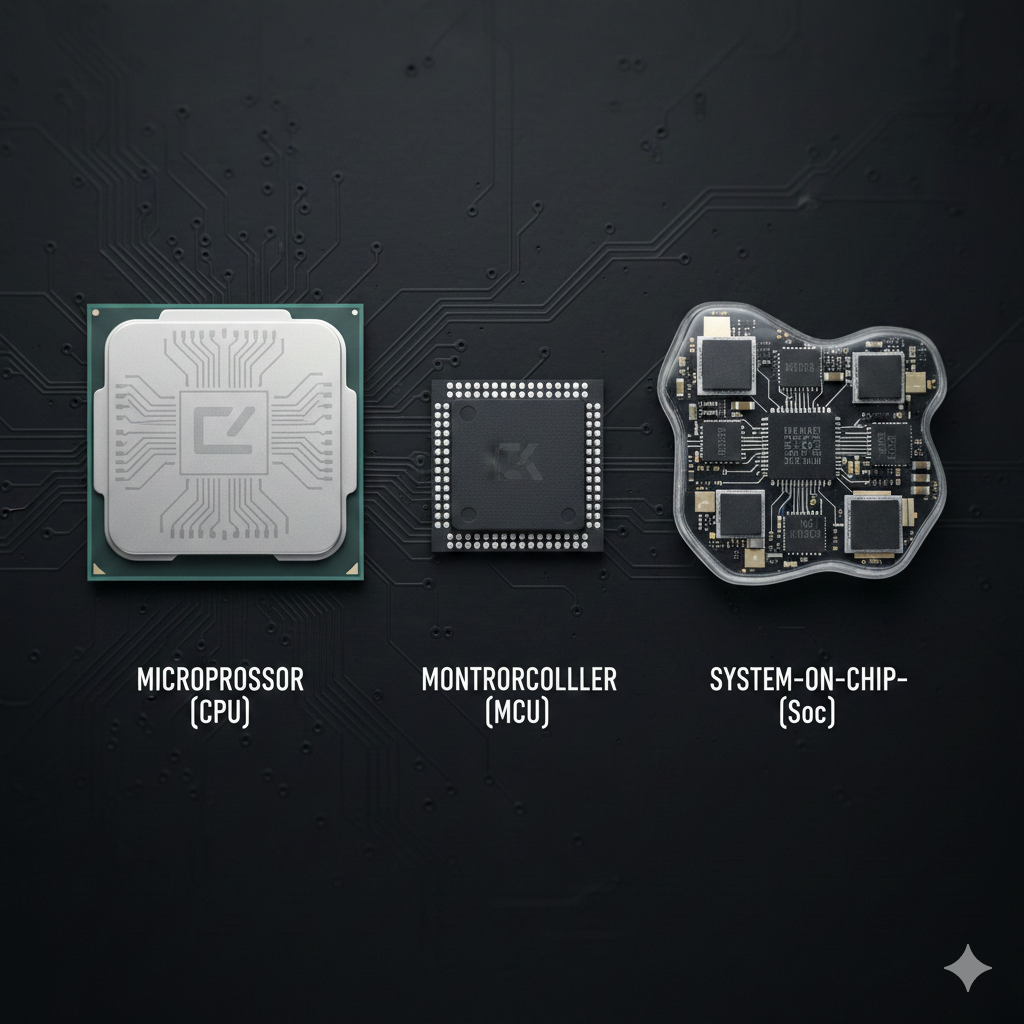
| Type | Description | Example |
|---|---|---|
| Microprocessor | CPU on chip. Does not include memory, storage, IO | Desktop CPU |
| Microcontroller | Single-chip computer that integrates a CPU, memory and peripherals | Arduino |
| SoC (System on a Chip) | Integrates one or more CPU, RAM, microcontrollers into one system | Raspberry Pi, Smartphone, tablet, laptop |
Bus
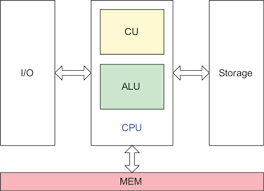
Internal Bus by Motherboard
CPU will have dedicated wires to GPU, RAM and chipset (peripherals) which looks like a star-topology where CPU is the center. Inside of the CPU, it has a ring or mesh topology to connect all the cores and cache.
Protocols
| Generation | Bandwidth per Lane (x1) | Full Slot Bandwidth (x16) | Standard in 2026 |
|---|---|---|---|
| PCIe 4.0 | ~2 GB/s | ~32 GB/s | Budget PCs / Older Macs |
| PCIe 5.0 | ~4 GB/s | ~64 GB/s | High-end Desktops / Servers |
| PCIe 6.0 | ~8 GB/s | ~128 GB/s | Cutting-edge AI Servers |
- PCIe (Peripheral Component Interconnect Express) is the interface standard for connecting internal computer components. Usually connect to GPU and primary SSD.
- DDR (Double Data Rate) tick on both edges of the clock. Used on RAM.
- DMI (Direct Media Interface) is the interface standard for connecting chipset and secondary storage (SATA / HDD / Extra SSD) all connected to this highway.
- NVMe (Non-Volatile Memory Express) is a type of flash memory and can handle parallel commands. THis fix the SATA problem. It lies on M.2 slot on the motherboard that is direct to CPU.
- SATA protocol, which was designed for slow, spinning mechanical hard drives which is sequential access.
Bandwidth
| Component | Type | Bandwidth | Typical Width | Description |
|---|---|---|---|---|
| CPU Desktop | Internal | ~500 GB/s | 256-bit | Data moves between cores and cache (L2/L3) |
| CPU Server | Internal | ~1792 GB/s | 512-bit | CPU Internal Fabric (Mesh/Ring) |
| CPU Desktop | External | ~50–100 GB/s | 128-bit | Typically uses Dual-Channel DDR5 |
| CPU Server | External | ~300–460 GB/s | 512-768 bit | Xeon or EPYC (8–12 channels) |
| GPU | External | ~64 GB/s | x16 lanes | PCIe 5.0 x16. Bidirectional aggregate of 128 GB/s |
| GPU | Internal | ~1700–1800 GB/s | 512-bit | GDDR7 RTX 5090 VRAM Bus |
| GPU HBM | External | ~4800 GB/s | 6144-bit | H200 (6 stacks on-package) |
| NVMe SSD | External | ~8 GB/s | x4 lanes | PCIe 4.0 x4 dedicated to one M.2 SSD |
| Chipset | External | ~16 GB/s | x8 lanes | Connects via DMI 4.0 (Intel) or PCIe (AMD) |
External Bus by Motherboard
Protocols
| Protocol | Speed | Use Case |
|---|---|---|
| USB3 | ~1 GB/s | Universal Peripherals |
| Thunderbolt 5 / USB4 v2 | ~10 GB/s | PC |
| GbE | ~10 Gb/s | One of the protocol on RJ-45 copper cable. May only travel < 100 meters |
Embedded System Buses
| Bus | Type | Use Case | Use Today |
|---|---|---|---|
| SPI (Serial Peripheral Interface) | Synchronous serial | Direct, point-to-point communication between two devices without a shared clock | Highly used today to debug with UART-to-USB as serial monitor. Located at COM port |
| I2C (Inter-Integrated Circuit) | Synchronous serial | Connecting many low-speed sensors to a single controller using only two wires | Used in IoT Sensors, smartphones |
| UART (Universal Async Receiver Transmitter) | Asynchronous serial | When you need to move a lot of data very fast over short distances with simple 2-wire (TX/RX) | Used in SD cards, displays, audios |
| CAN (Controller Area Network) | Message-based | Extremely robust, noise-resistant communication for "noisy" environments like engines or factories | Automotive, industrial automation |
Memory
Memory is a volatile, temporary quick storage managed by memory management. Usually it's called RAM(Random Access Memory). A paging/virtual memory maps shorter virtual memory address to physical memory address.
- GPU Overflow: Share some RAM with GPU
- RAM Overflow: Swap(borrow) to disk
- RAM as Buffer: Cache files from storage. When RAM is full, the kernel can clean the cache files to free up memory
RAM Types
| RAM Type | Actual Bandwidth (GB/s) | Latency (ns) | Description |
|---|---|---|---|
| DDR4 | 17 – 25.6 | 10-12 | Standard PC RAM (Per channel) |
| DDR5 | 38 – 51.2 | 10-14 | Modern PC RAM (Per channel). Low latency |
| LPDDR5X | 51 – 85 | 15-30 | Low power, high density for mobile devices |
| GDDR7 | 128 – 192 (per chip) | 30-50 | Ultra-high performance graphics memory. Have the highest frequency. |
| UMA (Apple Silicon) | 68 (M1) – 120 (M4) | 15-20 | Unified Memory (M4 Max / M1 Ultra example), CPU and GPU looks on the same memory |
| Server RAM (RDIMM) | 200 – 400 | 15-20 | Multi-channel (8-12) data center RAM. Registered DIMMs is stable and less error. Can have terrabytes of RAM |
| High Bandwidth Memory (HBM3) | 100 – 1024 | 10-20 | High-end Servers, GPUs |
- DRAM (Dynamic Random Access Memory): have its own chip to map physical address to RAM's actual logic gate address to deal broken circuit and evenly distribute the use of gates to increate durability
- PMIC (Power Management Integrated Circuit): Modern RAM manage power supply by its own by demand
- Peak speed of the RAM can increase 20~50% of its typical speed
- Frequency of RAM is measured in MT/s (Megatransfer per second)
Storage
SSD, HDD is a storage. Read Only Memory (ROM) is used for storing instructions. It was slow but non-volatile. Mask ROM can't be overwritten while flash ROM can.
Cache
| Cache Type | Role |
|---|---|
| CPU cache (L1/L2/L3) | Stores recently used memory |
| Disk cache | Stores recently accessed disk blocks |
| Filesystem cache | Buffers file reads/writes |
| Web/app cache | High-level user-space caching |
- L1: Closest to core, fastest, smallest (~32KB)
- L2: Shared per core or pair (~256KB-1MB)
- L3: Shared across all cores (~2MB-64MB)
Firmware & Boot Process
Firmware is the permanent software programmed into a hardware device's read-only memory. It is usually written in C/C++ or assembly language and compiled to binary machine code based on the chip specification. It provides the necessary instructions for how the device communicates with other hardware. Bootloader is a tiny program responsible for loading the main firmware/OS. GRUB, U-Boot, Windows Boot Manager are examples.
The PC Boot Sequence
Hardware Initialization (Firmware)
- Reset Vector: The CPU wakes up in a "dumb" state and jumps to a hardcoded address in the BIOS/UEFI chip.
- POST (Power-On Self-Test): The firmware checks if the CPU, RAM, and GPU are functional. If you hear "beeps," it's usually a POST failure.
- Hardware Config: UEFI sets up memory speeds, PCIe lanes, and internal power management.
Boot Manager
- Partition Search: UEFI scans storage devices for an EFI System Partition (ESP).
- Execution: It runs the
.efiboot manager (e.g., GRUB). Secure Boot may verify the file's digital signature here.
Kernel Initialization (The OS Takes Over)
- Loading the Kernel: The bootloader loads the OS Kernel (e.g.,
vmlinuz) and an Initial RAM Disk (initrd) into RAM. - Hardware Discovery: The Kernel uses ACPI tables (provided by UEFI) to find every piece of hardware on the motherboard. Unlike embedded systems, PCs are "Plug and Play" because of this discovery phase.
- Mounting Root: Once it finds the disk drivers, it mounts the main storage and starts the first user process (
systemdon Linux). - Background services start. User space is ready.
Embedded System Boot
Unlike PCs, embedded systems are often "static"—the hardware doesn't change, so the kernel doesn't need to "discover" it.
- The Device Tree (
.dtb): Instead of ACPI, embedded systems use a Device Tree. This is a file that tells the kernel: "The GPIO controller is exactly at address 0x3F200000." - Example (Raspberry Pi):
- GPU Boots First: On the Pi, the GPU actually wakes up before the ARM CPU!
- Firmware Loading: The GPU loads
bootcode.binfrom ROM andstart.elffrom the SD card, which then wakes up the CPU. - Kernel Execution: CPU starts the Linux kernel with the provided Device Tree.
Low-Level Development
Development Tools
| Tool | Use |
|---|---|
| Compiler: gcc, clang | Convert .c/.cpp to .o |
| Assembler | Convert .asm to .o |
| Linker | Link .o files into final binary using linker script |
| Debugger: gdb | GNU Debugger for C/C++ |
| OpenOCD | Open On-Chip Debugger |
| Flasher | Write binary into the chip |
| Build System: make, cmake, npm | Automate above steps |
| QEMU | Emulator |
| JLink Debugger | A very eficient piece of hardware, connects to your PC and the chip for debugging |
Analysis Tools
| Tool | Use |
|---|---|
| Oscilloscope | View voltage and current to check a GPIO pin |
| Logic Analyzer | View digital signal over time — usually across multiple lines. Great for reverse engineering, debugging SPI, I2C, ... |
Some CPU have a trace unit that records every instruction executed. Debugger use symbol + memory maps to remember the address of a memory location. CPU execution is abstract using symbol tables and IDE/GDB integration.
Real Time Operating System (RTOS)
An OS kernel designed for embedded systems that need predictable timing and task scheduling.
| RTOS kernel | Who Made It | Notes |
|---|---|---|
| FreeRTOS | Amazon | Most popular RTOS ever. Open-source, tiny (<10KB), easy to port. |
| Zephyr | Linux Foundation | Modular, modern, built for IoT. More complex, includes full drivers, POSIX-ish API. |
| CMSIS-RTOS RTX | Arm | Integrated in ARM ecosystem. |
| TI-RTOS | Texas Instruments | TI-specific, optimized for their chips. Not as portable. |
Operating System
The manager of computer resources and processes.
| Component | Description | Properties |
|---|---|---|
| Program | A static set of instructions (an application) | File-based, stored in disk |
| Process | A running instance of a program | Own independent memory space, isolated, can have multiple instances |
| Thread | A lightweight execution unit within a process | Shared memory with all other threads in the same process, concurrent, low overhead. Failing thread can cause the process to crash |
| Task | General unit of work (Process or Thread) | Scheduled by OS scheduler, priority based. Moves out (context switching) of CPU when it's terminated or need to wait for something |
| Scheduler | Decides which task runs next | The algorithm is usually hybrid of round-robin and priority |
OS Mechanism
- IPC (Inter-Process Communication): message queues, shared memory, socket, signal, semaphore, event flags.
- Race Conditions: If two threads try to change the same piece of data at the same exact time, the data can become corrupted.
- Deadlocks: Thread A is waiting for Thread B to finish, but Thread B is waiting for Thread A. They both get stuck forever.
- Starvation: A thread is never given a chance to run.
- Mutex: a lock so only one thread can own it. Used to protect shared resources. A thread can spinlock to acquire lock repeateadly.
- Semaphore: a counter that allow N threads to pass or wait.
- ISR(Interrupt Service Routine): Signal kernel to run an interrupt. Interrupt vector table maps an interrupt trigger to a handler function which tells what to do.
POSIX (Portable Operating System Interface)
A standard kenel call API for UNIX-like OS. It's implemented on UNIX, Linux, macOS but not Windows. Nowdays, developers use standard C/C++ libraries to implement POSIX for cross-platform. In POSIX, everything is a file; In windows everything is an object handle.
File System
| FS | Notes |
|---|---|
| ext4 | Default in Linux, simple, reliable and efficient |
| FAT32 | Universal, low-overhead, compatiblity, used for flash drives and SD cards |
| exFAT | Less universal, solve more than 4GB files that FAT32 has |
| NTFS | Windows default, complex and advanced |
| APFS/HFS+ | Apple systems |
| LittleFS / SPIFFS | For embedded systems (flash memory) |
| XFS | Effective on large files, teribble with tiny files. Once created, can never shrink |
| F2FS | For flash drives (like SD cards) |
| s |